In the "Secondary" UDP Server area:
Set the Server name or IP Address 3.22.55.64
Make sure the Server port is set to 2238
Click the checkbox to "Enable logged contact ADIF broadcast"
This setup guide is not an install manual for your FT8 software. These instructions are for sending your logged QSOs to the FT8OFF Scoreboard. In order to properly send your logged QSOs to the scoreboard, software settings need to be updated.
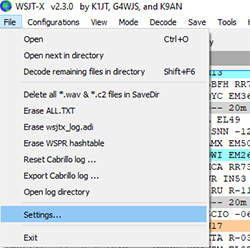
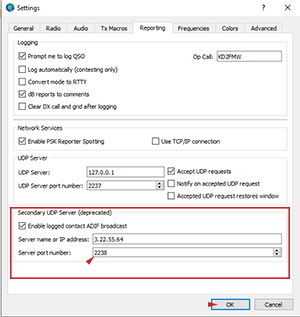
In the "Secondary" UDP Server area:
Set the Server name or IP Address 3.22.55.64
Make sure the Server port is set to 2238
Click the checkbox to "Enable logged contact ADIF broadcast"
If your QSO does not appear in either last 10 list, double check the settings page. If your settings are correct, and if after 3 successful FT8 QSOs you are sill not appearing on the last 10 list, post in the ft8off room on the TOADs discord requesting further assistance.
Using JTDX for the FT8OFF requires the use of a local listener program. This program runs on Windows 10 64 bit only. The program is available at this link. After downloading the .zip file, extract the contents and you can now run jtdx-monitor.exe. This program must be started and left running for JTDX to send your QSOs to the scoreboard.
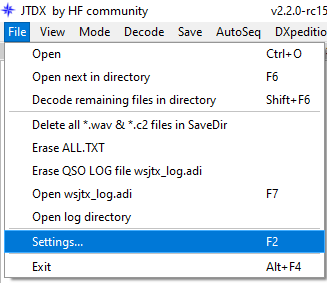
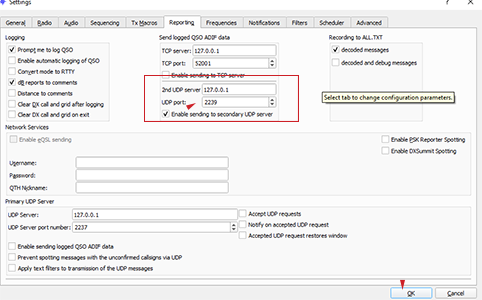
In the Send logged QSO ADIF data area:
Set the 2nd UDP server to 127.0.0.1
Make sure the UDP port is set to 2239
Click the checkbox to "Enable sending to secondary UDP server"
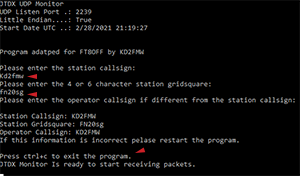
This program will require the following:
Type the station's callsign and press "Enter/Return"
Type the 4 or 6 digit maidenhead gridsquare for the current staion location and press "Enter/Return"
If the operator of the station is different from the station's callsign, enter the operator's call and press "Enter/Return"
You will see the information you entered written back to you. If it is incorrect you need to restart the program. Press ctrl+c to close the program and then reopen it to reset the data.
If your QSO does not appear in either last 10 list, double check the settings page. If your settings are correct, and if after 3 successful FT8 QSOs you are sill not appearing on the last 10 list, post in the ft8off room on the TOADs discord requesting further assistance.